What do you have to work with?
| You have | Try this idea | Check first |
|---|---|---|
| A clear photo of one dish | An ingredient breakdown | Which ingredients can be named from your menu? |
| Photos of an order and current prices | A receipt-style sequence | Do the items and prices match what you sell? |
| A bake with a recognisable recipe | A short guessing game | Do the clues accurately describe that product? |
These examples use Frontreel’s fictional demo businesses. Borrow the structure, then replace every product detail with information from your own menu.
1. Explain what goes into one dish
Fictional business demo. This shows a creative approach, not a customer result.
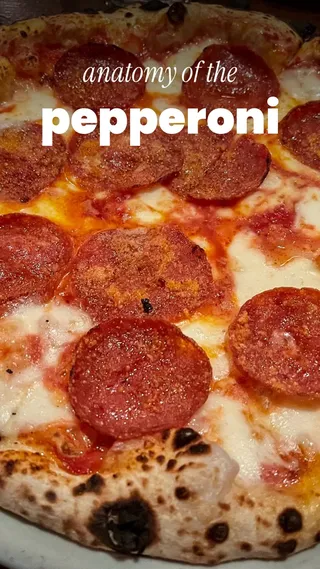
Open on the finished dish, move through its defining ingredients and return to the whole serving. Labels give the viewer something specific to notice.
In the Marlow’s Pizza demo, the camera moves over a pepperoni pizza and labels the toppings before showing the price. An illustrated treatment makes the labels part of the composition.
What your version needs
- A clear photo of the actual dish, with enough detail to identify the parts being discussed.
- Ingredient names verified against your menu or supplied recipe description.
- The item name and current price, if the price will appear.
Keep the labels selective. A photo of a sandwich does not prove that the bread is baked in-house or that the filling is locally sourced. Include those claims only when your own published material supports them.
This is a useful structure for introducing a signature item or explaining a dish whose name alone says little. See the restaurant service.
2. Turn an order into a little sequence
Fictional business demo. This shows a creative approach, not a customer result.
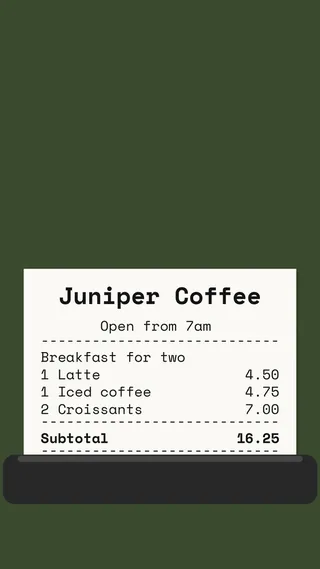
A receipt gives an ad a natural order: reveal an item, attach its price and build toward the complete purchase. It can make a multi-item order easier to follow.
The Juniper Coffee demo prints a latte, an iced coffee and two croissants before showing the items with their receipt lines. The prices belong to a fictional demonstration.
What your version needs
- Photos of the drinks or food you want in the order.
- Exact menu names, sizes and current prices.
- Any relevant availability limits, such as breakfast hours.
An example order is not automatically a discounted bundle. If your menu sells the items separately, describe them that way. Only call it a special or meal deal when that offer actually exists, with its terms verified.
For a café, a drink and something from the counter can give the order a clear theme. See the coffee shop service.
3. Reveal a bake from its ingredients
Fictional business demo. This shows a creative approach, not a customer result.
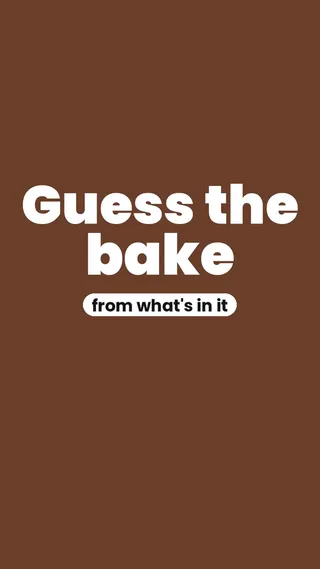
Show a few clues, leave a brief pause for a guess, then reveal the product. The viewer should be able to understand the question without needing an explanation in the caption.
The Fernhill Bakery demo uses two rounds, each with ingredients and a reveal. You could start more simply with one product and a few recognisable clues. That is a proposed adaptation, not another finished example.
What your version needs
- A photo of the finished bake.
- Accurate ingredient clues from your own menu or recipe description.
- A clear reveal with the item name.
Choose clues that distinguish the product. Generic baking ingredients may fit everything in the case. Avoid turning a short ingredient list into an allergen or dietary assurance; use only claims your business has verified.
A quiz is a creative format, not a promise of comments or sales. See the bakery service.
Adapt the message before adding more effects
The same basic structure can serve a different menu moment. These are starting points for a brief, not claims about what your business currently offers:
- A new item: introduce its name and one distinguishing detail supported by your menu.
- A seasonal offer: include the verified availability window and stop using the ad when it ends.
- A box or group order: show the actual contents, quantity and ordering instructions.
Give each ad one next action, such as viewing the menu or placing an order through your existing channel. Check that the destination and ordering details are current before posting.
A brief you can fill in
Feature: [exact item or order]
Say: [one verified message]
Use: [photo filenames and menu link]
Show at the end: [business name and next action]
Run until: [offer end date, or no dated offer]
Avoid: [wording or visual details that would be inaccurate]
Before approving the finished ad, check the dish, names, ingredients, prices and dates. Watch it without sound to check that the message still makes sense, and inspect both delivered formats.
If the photos are the sticking point, start with the photo checklist. If you want help choosing the concept, Frontreel can suggest an approach after reviewing your material.